

Stop emailing
Start requesting them safely.
Magic-link document collection for real estate agents. Clients upload ID, source-of-funds and offer documents through one secure link - virus-scanned, encrypted, and audit-logged. Built to make AML/KYC document collection painless.
Free until February 28, 2027 · Invite only · No card needed
Hosted in Canada by a Canadian company - outside the direct reach of US CLOUD Act orders.
Real estate agent
Sound familiar?
Every deal means chasing ID and source-of-funds paperwork through a dozen emails before closing.
- Collect the AML/KYC document set through one branded link instead of a scattered email thread.
- Files virus-scanned, encrypted at rest, and audit-logged as your record of what was collected and when.
- Send signed documents and closing packages back through the same link.
Three steps. No software for your client.
Create a request
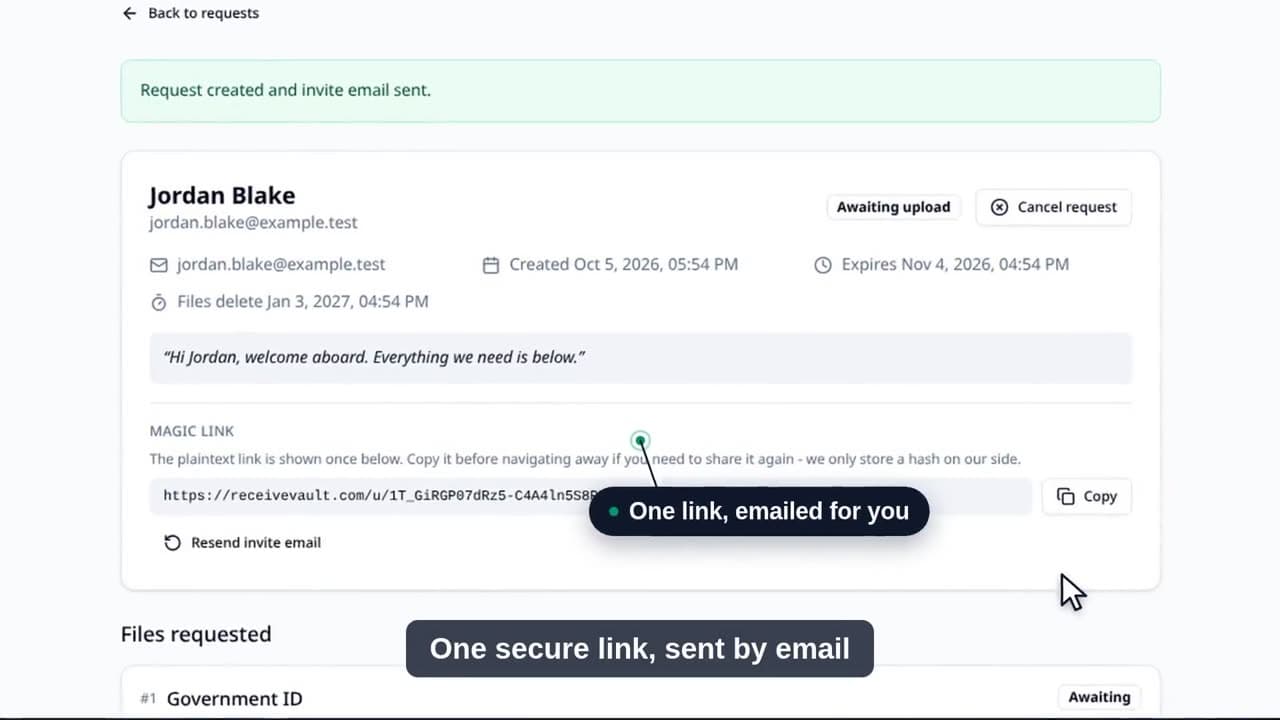
List the files you need. Start from a ready-made template or build your own checklist - it adapts to whatever you collect.
Your client gets a magic link
One email, one click, no account. They see a tidy checklist on a page branded as your firm, not ours.
Files land in your dashboard
Each one is scanned for viruses, encrypted at rest, and added to the audit log so you know who sent what when.
Who can be ordered to hand over your clients’ files?
The US CLOUD Act lets US authorities compel any US-based provider to produce data it controls, wherever that data physically sits. Most secure-file tools are US companies, so which data center they picked never really answers the question.
A US tool with a Canadian region
- ProviderUS company
- ServersIn Canada
- Who can compel itUS authorities, directly
Data residency. The files are in Canada, but the company holding them answers to a US court.
ReceiveVault
- ProviderCanadian company
- ServersCanadian-owned, in Toronto
- Who can compel itCanadian courts
Data sovereignty. There is no US-owned company in the custody chain of your clients' files.
ReceiveVault runs on servers owned and operated by a Canadian hosting company, for a Canadian company. Your clients’ files sit outside the direct reach of a US CLOUD Act order and are handled under Canadian privacy law.
Can US client data live in Canada? GLBA, CCPA and most state privacy laws ask for reasonable safeguards, not US storage. Protected health information is the exception here: we do not sign HIPAA business associate agreements, so keep PHI out. Check any contract or government work that names a data location.
No provider is beyond all legal process. Canadian courts can compel production, and governments cooperate through treaty channels. What changes is whose law and whose courts, and that no US-owned company holds your clients' files. Email notifications leave through easyDNS, a Canadian mail relay, and then reach each recipient's own email provider; file contents never leave Canadian infrastructure.
Read the full explainer: does the US CLOUD Act reach your clients' files?
Also in this series: the twelve questions to put to any vendor before your clients’ files go into its system. See all guides.
The boring parts, done properly.
Scanned before you open it
Every upload goes through ClamAV and is held until it comes back clean. Infected files are quarantined and you get an alert.
Encrypted, with a deletion date you set
Files travel over TLS and are stored with server-side encryption. Every request carries a deletion date you choose.
Every action logged in plain language
Who sent the request, who uploaded, who downloaded, and when. The activity log reads like a sentence, not a server log, and it is exportable.
Common questions
Does this help with AML/KYC document collection?+
Yes. Clients upload through a magic link with optional email verification, files are encrypted and audit-logged, and the audit trail records exactly what you collected and when. The technical controls support your AML/KYC obligations, though compliance ultimately remains your responsibility.
Where are the files stored?+
On S3-compatible object storage with server-side encryption, running on servers owned and operated by a Canadian hosting company on Canadian soil. Files are never copied to third-party clouds, and no US-owned provider sits in the custody chain.
Does the US CLOUD Act reach my clients’ files?+
A CLOUD Act order is served on a provider subject to US jurisdiction. The application, the database, and your clients’ files all run on infrastructure owned and operated by a Canadian company, so there is no US provider in that chain to serve. Files are subject to Canadian legal process instead. No provider is beyond all legal process - courts on either side of the border can compel production through their own channels - but the direct route does not exist here.
What happens to files after the request expires?+
Every link expires, and you choose when. Each request link carries an expiry you set when you create it (30 days by default, up to 90), and outbound deliveries carry one you set per send. Once a link expires the magic link stops working. Files you received stay in your dashboard until you delete them or their retention window passes: 90 days from the request's last activity by default, or whatever window you set, up to one year at most. Files you send out are deleted 30 days after the delivery expires. This is a transfer service, not a document archive, so keep your own copy of anything you need to retain.
Is this HIPAA / GLBA / CCPA compliant?+
The product is built with privacy-by-design expectations in mind: minimum-necessary collection, audit logging, encryption, expiry. We are not HIPAA-certified and do not sign BAAs at this tier; for HIPAA-adjacent workflows we provide the technical building blocks (encryption, access logs, MFA) but compliance certification is your responsibility. GLBA and CCPA obligations are similarly supported but ultimately yours to attest.
Is it free during the private beta?+
Yes. Invited accounts get every feature free while the private beta runs, and no card is needed. Request an invite from the signup page.
Can my clients reply to the magic-link email?+
Yes. Invite emails go out with your email address as the reply-to, so your client can ask a question and it lands in your inbox like a normal reply.
How are accounts and client pages protected?+
Every account can use an authenticator app, hardware passkeys (YubiKey, iCloud Keychain, Windows Hello), and recovery codes, and destructive actions ask for your password again. The pages your clients see carry no advertising or analytics trackers.
Why not just email it?
How it compares with email and the usual file-sharing links.
- Client needs an account
- ReceiveVault
- No
- No
- Dropbox / WeTransfer
- Sometimes
- Virus scan before you open it
- ReceiveVault
- Every upload
- No
- Dropbox / WeTransfer
- No
- Canadian-owned hosting
- ReceiveVault
- Yes, in Canada - outside US CLOUD Act jurisdiction
- Usually no
- Dropbox / WeTransfer
- No
- Deletion date on every request
- ReceiveVault
- Yes, you set it
- No
- Dropbox / WeTransfer
- Varies by plan
- Who-did-what log
- ReceiveVault
- Every action
- No
- Dropbox / WeTransfer
- Limited
Further reading
- FINTRAC document collection for real estate agents
Real estate transactions come with ID and source-of-funds obligations. Here's how to collect that paperwork securely on every deal.
- Does the US CLOUD Act reach your clients' files?
"Stored in Canada" and "held by a Canadian company" are different claims, and only one of them decides whose court can order the files produced. Here is the difference in plain terms.
- Is Dropbox PIPEDA compliant?
PIPEDA does not certify software, so no tool can hand you compliance. Here is what the law actually asks of you when you put client documents in a US-owned cloud, and what to check before you do.
Try it on your next deal.
Free until February 28, 2027. No card. Your clients never need an account.